Connect your agents.
Review and install the local hooks for each provider in Settings.
Perch for Mac · macOS 14+
Perch sits at the edge of your Mac and shows which Claude Code, Cursor, and Codex sessions are working, finished, or waiting for you. Stop tab-hopping. Get back to building.
$29 USD, one time · No subscription · Purchases open when delivery is ready
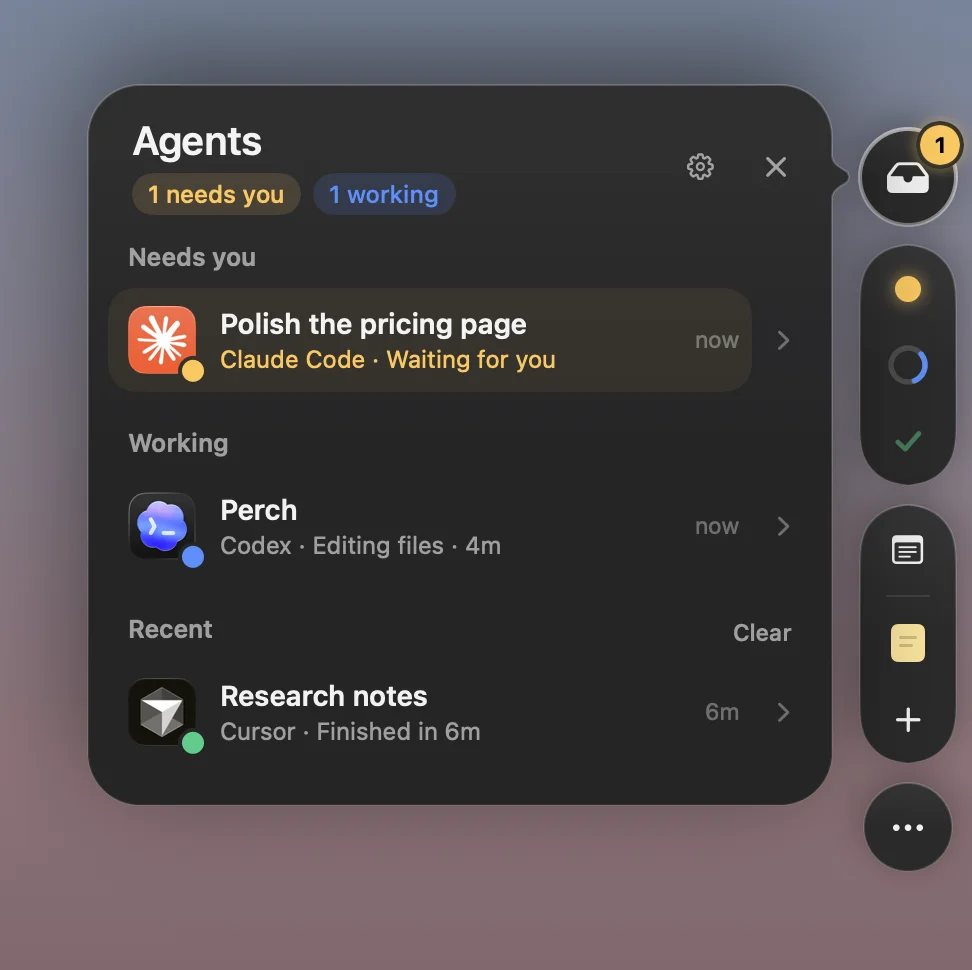
Native app capture · sample activity, not live agent verification
How it works
A small, independent utility for the agents you already use. No new coding environment to move into.
Review and install the local hooks for each provider in Settings.
A small mark shows activity. Open the shelf for session details and pinned notes.
Open the provider or supported session and respond there. Perch never replies for you.
Everything in view
Small details that add up to fewer interruptions and more time on the work itself.
A small edge tab keeps agent activity in view. Open the shelf to see Needs you, Working, and Recent sessions.
Open the provider or supported session, copy a resume command, or hide a session until it changes. Answer in your agent’s own app.
Pin a note to your screen edge. Ten small notes, four colors, and a place for the detail you’ll need in a minute.
Events and notes stay local. Perch discards prompts, tool contents, and credentials, and makes no network requests.
Perch observes activity. It never approves a tool, sends an agent a reply, or makes a decision for you.
Review the local hook changes before installing. Pause monitoring or remove a provider’s hooks in Settings.
The connections, honestly
Perch reads local events. It doesn’t read your prompts or send replies. Your agent plans and API costs stay separate.
Cursor’s passive hooks don’t expose permission-waiting status. Session-opening behavior varies by provider.
Pricing
No monthly bill. No annual plan. Just a useful tool, on your terms.
$29USD · one time
View purchase detailsPurchases closed until delivery is ready. No payment is collected.
App license only · Source code not included · Applicable taxes shown at checkout.
The current build has adapters for Claude Code, Cursor, and Codex. Live Claude Code CLI and Cursor local Agent checks are recorded. Live Codex coverage is still being verified. Ordinary Claude chats and OpenCode are not supported.
No. Perch shows status and opens the provider or supported session. You reply and approve tools in the agent’s own app. Cursor’s passive hooks do not expose awaiting-permission status.
Supported Claude desktop Code sessions can open their conversation. Terminal sessions open their terminal host. Cursor opens the app rather than a specific chat. Codex deep links remain unverified live.
No. Perch is an independent Mac app for macOS 14 and later. It has no account or server. Your coding-agent subscriptions and API costs remain separate.
$29 USD, paid once. No subscription. Applicable taxes will be shown at checkout. Purchases are closed until the app is ready to deliver.
The native Mac app, agent-activity shelf, pinned sticky notes, keyboard shortcuts, and local storage. This is the app license; source code is not included.
A single payment for a non-expiring license to the purchased version. Update coverage, device limits, support, and refund details will be published before sales open.
